Saturday, October 3, 2026 · Graphic Design
Sales Presentation Software: A 2026 Buying Guide for Growing Teams
Noted by Kalyn Lewis · 634 reads
Compare seven tools by how they help sales teams find, manage, personalize, share and measure content, then price the workflow your reps actually use.
The editor is rarely the part of sales presentation work that slows a team down. Reps lose time searching for current material, rebuilding slides that already exist and asking whether they can change a template. Then a presentation goes to a buyer, and the team may have little idea what was opened or which sections mattered.
That’s why a useful software comparison needs to follow content through the sales workflow: finding approved material, protecting key elements, tailoring it for a prospect, sharing it in a format the buyer can use, measuring engagement and deciding what to improve. A tool that creates polished slides can still leave those other steps unresolved.
This guide compares Visme, Beautiful.ai, Canva Business, Pitch, Gamma, PowerPoint with Copilot and Google Slides with Gemini across those steps, plus pricing, collaboration, integrations, administration and file compatibility. It also offers a way to estimate the cost of your existing process. A useful starting point is to map your own workflow against this presentation software comparison landscape, then test the tools with real sales material.
Why the whole workflow matters
As more reps reuse and adapt sales material, it gets harder to keep every version accurate. Someone might combine slides from an older deck, a customer story from another file and product details that have since changed. The result is often called a “Frankendeck.” Its inconsistent design is visible; the deeper problem is that buyers can receive different messages or outdated information.
Visme’s B2B Sales Content Benchmark surveyed 164 revenue teams. It found that 85% lose between 10% and 50% of their working week redoing content they thought was finished. It also found that 53% had sent outdated, off-brand or incorrect content to a customer in the previous month. These figures point to a process and visibility problem as much as an editing problem.
A strong evaluation therefore looks at how a platform supports the full content lifecycle:
- Find: Reps can locate the latest approved decks, slides and other sales material.
- Govern: Teams can set rules for what stays consistent and what reps may change.
- Personalize: Reps can tailor approved material to an opportunity without rebuilding it.
- Share: They can send links or export files in formats buyers can use.
- Measure: The team can see whether buyers opened a presentation and, where supported, which parts drew attention.
- Improve: Sales and marketing can use those signals to update, retire or create material.
This is a practical evaluation model, not a claim that every team needs every capability. The right balance depends on team size, the types of material reps use and how much control or measurement the organization needs.
What changes as a team grows
Fewer than 10 reps: make creation and sharing easy
A small group may know where its current deck lives and be able to coordinate updates directly. At this stage, look for a tool that helps reps create, personalize and share a polished presentation without adding unnecessary steps. A simple shared library and a clear template may solve more than a complex set of controls.
10–49 reps: consistency takes more effort
More reps, products, regions and customer types usually mean more variations of the same basic story. Teams may have industry-specific decks, product presentations, proposals, customer stories, quarterly business reviews and opportunity-specific versions.
At this size, ask whether reps can find the right asset without searching old folders, whether marketing can update shared material without tracking down every copy, and whether reps can customize a presentation while leaving approved elements intact.
50 or more reps: administration enters the shortlist
For larger groups, editing ease is only one part of the decision. The software also needs to fit the existing tools and administrative needs. User roles, permissions, single sign-on (SSO), user provisioning, review workflows and customer relationship management (CRM) integrations may determine which plans are suitable.
Choose with the next stage of growth in mind. Paying for controls the team won’t use adds cost; selecting a tool that can’t support the workflow as it expands may lead to another change later.
Six tests for your shortlist
Use the path your sales content takes as the structure for a product trial. The sales content lifecycle offers six practical questions.
1. Find: can reps locate current, approved material?
Ask how a rep can tell whether a file is the latest version. If the answer depends on a chat announcement, a shared-drive folder or remembering which file named “FINAL_v6” is current, the process relies on individual memory.
Look for a central place to find approved presentations, templates, slides and reusable assets. Then test it with a library that resembles your real one. Can administrators update or retire material? Can a rep distinguish approved assets from personal drafts? When a shared slide changes, can the update reach existing presentations, or does each copy need separate maintenance? Can users find a specific asset among hundreds?
A five-slide demo library won’t answer those questions. Ask to see search and organization at a scale close to yours. This related report offers additional context on production bottlenecks across 164 revenue teams: How to Speed Up Sales Content Production.
2. Govern: what can reps change?
A collection of approved fonts, colors and logos is useful, but it doesn’t define what happens when a rep edits a presentation. Check whether administrators can protect particular elements, assign different editing rights by role and require review before material is shared.
Break governance into five areas:
- Brand assets: Approved fonts, colors, logos and other visual elements.
- Brand templates: Approved starting points for sales work.
- Editing controls: Protection for elements that should remain fixed.
- Permissions: Different editing rights for different roles.
- Approvals: A review step before material is published or shared.
Visme Enterprise offers controls that can lock the location, content and formatting of individual text boxes, with editing permissions based on user roles. Canva Business offers Brand Controls for approved colors and fonts and can require design approval. Microsoft provides Brand Kits for Copilot users with eligible licenses. Compare the controls themselves, not just whether a product uses the word “branding.”
3. Personalize: how long does it take to prepare a deck?
“Easy to use” is difficult to judge from a demo. Instead, give one of your reps an approved deck and ask them to tailor it for a real account. Have them update the industry context and problem statement, add a relevant customer story and personalize the company details.
Observe whether the rep can make those changes within the approved structure, find and reuse appropriate slides, and finish without help from marketing or design. Note which steps require leaving the platform or searching other folders.
Apply the same test to AI features. Slide generation from a prompt may look impressive, but the sales question is whether the output helps a rep personalize approved material. Check for off-brand layouts, inaccurate details or generic copy, and record how much editing the result needs. Have your own rep test your own deck; that will reveal more about day-to-day fit than a prepared demonstration.
4. Share: can buyers use the format you send?
Not every buyer consumes a sales presentation in the same way. A trackable link may preserve interactive elements and reveal engagement. A PDF is easy to download and forward. Some buyers want an editable PowerPoint file for internal review, while others need to view material offline.
Review how your reps have shared material across recent opportunities. Do they need links, PDFs, PPTX files or offline access? Can recipients open a shared link without an account? Can access be limited or revoked? When a file is exported, what happens to fonts, charts, animation and embedded media?
Try each relevant route with a real presentation. A capable editor can still be a poor fit if its links or exported files don’t suit how your buyers work.
5. Measure: what can you learn about buyer engagement?
Analytics vary in depth. One platform may report a view; another may show individual slide views, time spent, repeat visits or viewer information. Knowing that a presentation was opened is useful, but seeing which sections drew attention can give a rep a more specific follow-up signal.
- Does tracking work for external buyers, or only for people inside your organization?
- Who can be identified, and what does the viewer need to do for that to happen?
- Can the team see slide views, time spent and repeat visits?
- Can reps receive a notification when a buyer opens the material?
- Can engagement data be exported or sent to a CRM record?
- Which plan includes the tracking your team needs?
Visme Analytics can combine registration information with viewer and slide-level engagement. Pitch’s Business plan includes advanced links with visits, slide views and time spent. Gamma offers detailed analytics on Pro and higher plans, though viewers who aren’t signed in may appear as anonymous. Test with an external viewer: “analytics” doesn’t mean the same thing in every product.
6. Improve: can the data help the wider team?
Analytics are more useful when sales and marketing can learn from them beyond a single opportunity. Consider whether the software can show which presentations reps use, what buyers engage with and which assets appear to need an update. That evidence can inform what the team improves, retires or creates next.
Presentation tools don’t all provide organization-wide content usage or coaching insights. If those needs are central, compare sales enablement products such as Highspot and Seismic as well. A broader platform may be appropriate, but first decide what level of content insight your team will act on.
Other buying factors
Pricing and plan requirements
Compare the plans that include your required features, not just the lowest listed seat price. SSO, advanced permissions, review workflows, analytics and CRM integrations may be limited to higher tiers. Check minimum seat counts, billing terms and add-ons. Use the same team size and requirements for every quote.
Collaboration
Map how sales, marketing, enablement and design work together. Depending on your process, you may need real-time editing, comments, shared workspaces, review workflows, guest access or contributor roles. Collaboration describes how people create and review material together; governance defines what they’re allowed to change.
AI capabilities
Evaluate what the AI helps a rep do: generate a presentation, work from existing material, personalize approved content, rewrite copy or adjust layouts while keeping the brand intact. Use the same deck and sales brief across your shortlist. Compare the output and the time needed to edit it.
Integrations
Check where the platform needs to fit into your sales workflow, especially your CRM, cloud storage and communication tools. An integration logo doesn’t explain what reps can do. Find out whether they can open sales assets from a CRM, use customer data in a presentation, share a link or send engagement data to a deal or contact record. See the available Visme integrations as one example to evaluate against your own requirements.
Administration and security
If your organization has specific IT needs, check them before settling on a preferred product. Depending on the team, requirements may include SSO, user provisioning, role-based permissions, two-factor authentication, audit logs and centralized administration. Confirm which plan includes each control.
PowerPoint compatibility and migration
Teams with an existing PowerPoint library should test both import and export before moving. See how fonts, layouts, charts, animation and other elements survive. If buyers request editable PPTX files, export a real presentation and open it in PowerPoint to check what remains editable.
Room to grow
Consider how the software will handle more reps, assets, products, regions and permissions. The goal is a plan that fits current needs and can accommodate likely growth without paying today for controls the team may never need.
Comparing seven options
The figures and features below are the details supplied in this guide. Pricing, plan access and product capabilities can vary by license and may change, so confirm them against the needs you define for your evaluation.
| Buying factor | Visme | PowerPoint + Copilot | Google Slides + Gemini | Canva Business | Beautiful.ai | Pitch | Gamma |
|---|---|---|---|---|---|---|---|
| Team pricing | Pro: $24.75/user/month, billed annually. Enterprise: custom. | Microsoft 365 subscription plus applicable Copilot licensing. | Google Workspace subscription; Gemini included in eligible plans. | $250/user/year. Enterprise: custom. | Team: $40/user/month, billed annually. Enterprise: custom. | Team: $19/month billed annually; Business: $25/month billed annually. | Business: $40/seat/month. Enterprise: custom. |
| Brand controls | Brand Kit, templates and shared content; advanced permissions, reviews and editing controls on Enterprise. | Organization templates and Brand Kits with eligible Copilot licensing. | Organization themes and templates. | Up to 100 Brand Kits; Brand Controls and approvals on Business. | Shared templates and slide library, locked slides and brand controls on Team. | Custom templates, fonts and shared assets; template controls on paid team plans. | Custom branding and themes on eligible paid plans. |
| AI creation and personalization | AI presentation generation plus writing, design and editing tools; branded workflows on eligible plans. | Copilot can create and edit presentations using prompts, files and organizational material. | Gemini can generate slides and presentations from prompts and reference material. | Tools for presentation creation, rewriting and branded content. | AI-assisted creation with automated layouts and design. | AI creation, rewriting and editing. | AI-led generation, rewriting and restyling. |
| Collaboration | Comments, annotations, shared folders and live editing; advanced roles and reviews on Enterprise. | Real-time coauthoring through Microsoft 365. | Real-time editing, comments and version history. | Real-time editing, comments, permissions and approvals. | Collaborative editing, shared libraries and version control on Team. | Editing, comments, guests, teamspaces and workspace roles. | Shared workspaces and team collaboration. |
| Content management and reuse | Folders, Slide Library, content blocks, templates and team assets. | SharePoint, OneDrive and organization templates support storage and reuse. | Drive and shared drives support file organization. | Folders, Brand Templates, Brand Kits and reusable components. | Centralized slide, template and asset libraries. | Workspace library, collections, templates and assets. | Workspace organization, themes and reusable templates. |
| Version history and updates | Version history and managed templates; shared slides can update across presentations. | Microsoft 365 history; templates and files managed through SharePoint or OneDrive. | Version history and managed files through Drive and shared drives. | Version history and managed templates and assets. | Version control and managed shared slides and templates. | Version history and shared workspace content. | Version history and shared workspace content. |
| Sharing and export | Links, PDF, PPTX, HTML5 and other exports on eligible plans. | PPTX, PDF and Microsoft 365 sharing. | Google links, PPTX, PDF and other downloads. | Links and multiple download formats. | Secure sharing, PDF and editable PowerPoint export. | Links, PDF and PowerPoint export on eligible plans. | Links, PDF, PPTX, PNG and Google Slides export. |
| PowerPoint import and export | PowerPoint import; PPTX export with limitations. | Native PowerPoint format. | Opens or imports PowerPoint files and exports PPTX. | Imports presentations and exports PPTX. | PowerPoint import and editable export. | PPTX import; export on eligible plans. | PowerPoint import and PPTX export. |
| Buyer analytics | Presentation and slide analytics; more viewer data on higher tiers. | No comparable native prospect-level presentation analytics. | Activity Dashboard focuses on Workspace collaboration, not dedicated prospect analytics. | Design insights, not dedicated sales-prospect analytics. | Viewer and slide analytics, with engagement alerts on Team. | Advanced links track visits, slide views, time and email capture. | Detailed analytics and advanced sharing on Pro. |
| Sales integrations | Integrations available; Salesforce and HubSpot listed on Enterprise. | Microsoft ecosystem and third-party integrations. | Google Workspace and Marketplace integrations. | Apps and integrations; custom integrations on Enterprise. | Integrations available; check Salesforce against the use case. | HubSpot, Slack and other integrations; API on select plans. | API and connectors on eligible plans; Enterprise adds connector and API controls. |
| Security and administration | SSO, two-factor authentication, custom roles and permissions on Enterprise. | Microsoft 365 identity, security and admin controls. | Google Workspace identity, security and admin controls. | SSO and SCIM on Enterprise. | SSO, SCIM, advanced permissions and audit or change logs on Enterprise. | SSO and SCIM on Enterprise, with a 30-seat minimum. | SSO on Business; SCIM and advanced admin controls on Enterprise. |
| Other content formats | Proposals, documents, one-pagers, infographics, forms and microsites. | Primarily presentations; other Microsoft 365 products cover other formats. | Primarily presentations; other Workspace products cover other formats. | Documents, whiteboards, social content, video, websites and more. | Primarily presentations. | Presentations and pitch rooms. | Presentations, documents, websites and other generated content. |
Match the tool to the way you sell
Beautiful.ai is worth considering when the priority is a consistent presentation design process. It automates much of the layout work and provides shared libraries, locked slides and version control. Teams that also produce proposals, one-pagers and other sales material may need another tool for those formats.
Visme may fit teams that want decks and other sales assets in one workspace. Reps can work on proposals, one-pagers and leave-behinds alongside presentations, while marketing can prepare templates and reusable assets and set limits on what reps can change.
Our proposals go out as infographics, not decks. They’re built from templates, so reps can personalize one for a specific account quickly. They include video and link to the resources different stakeholders care about.
When a proposal gets forwarded to the CFO, the IT lead and whoever will own the rollout, each person can find what they need without a rep in the room. That’s the job of a proposal: to multi-thread for you. It’s also why we create more than presentations in the same workspace.
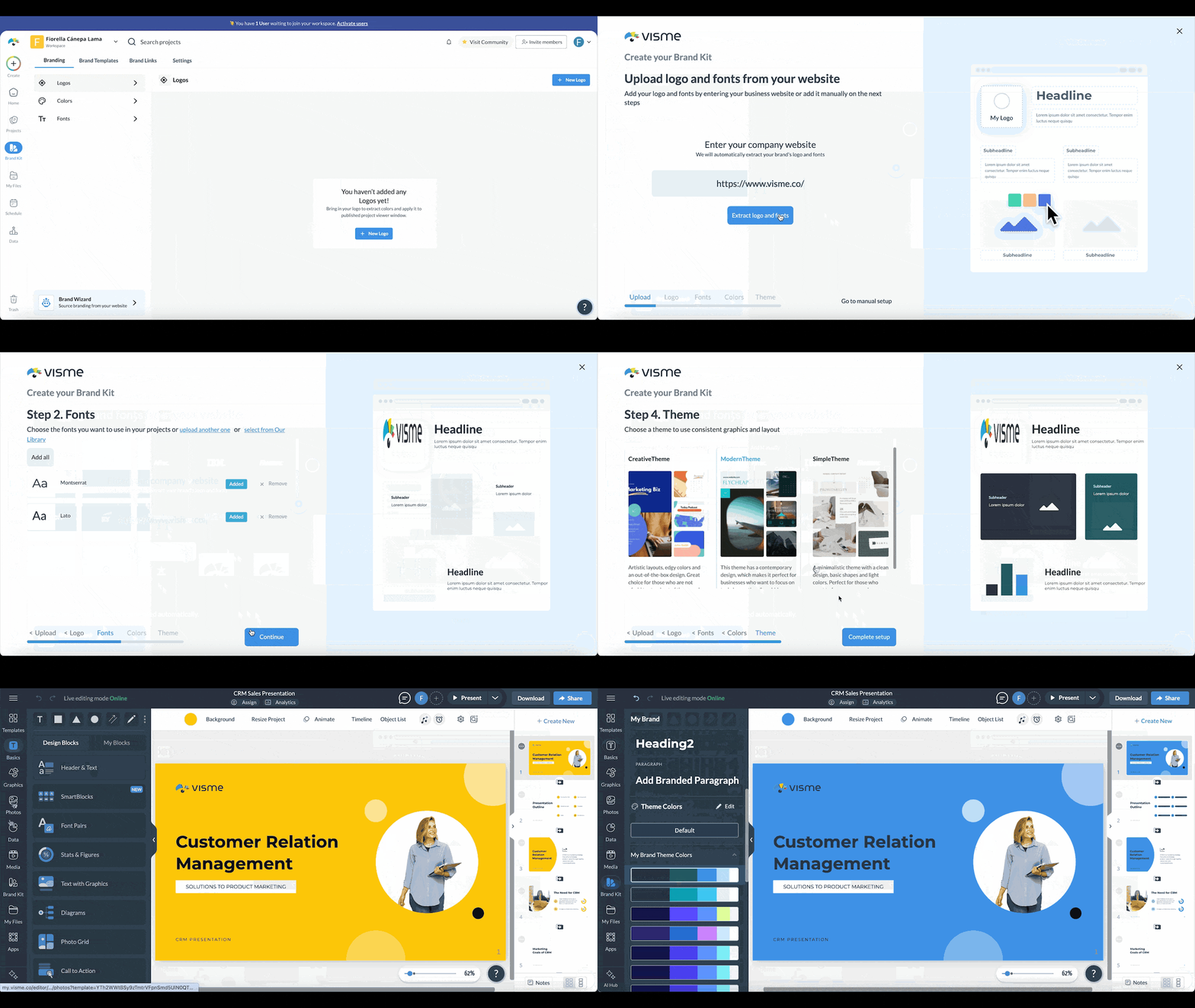
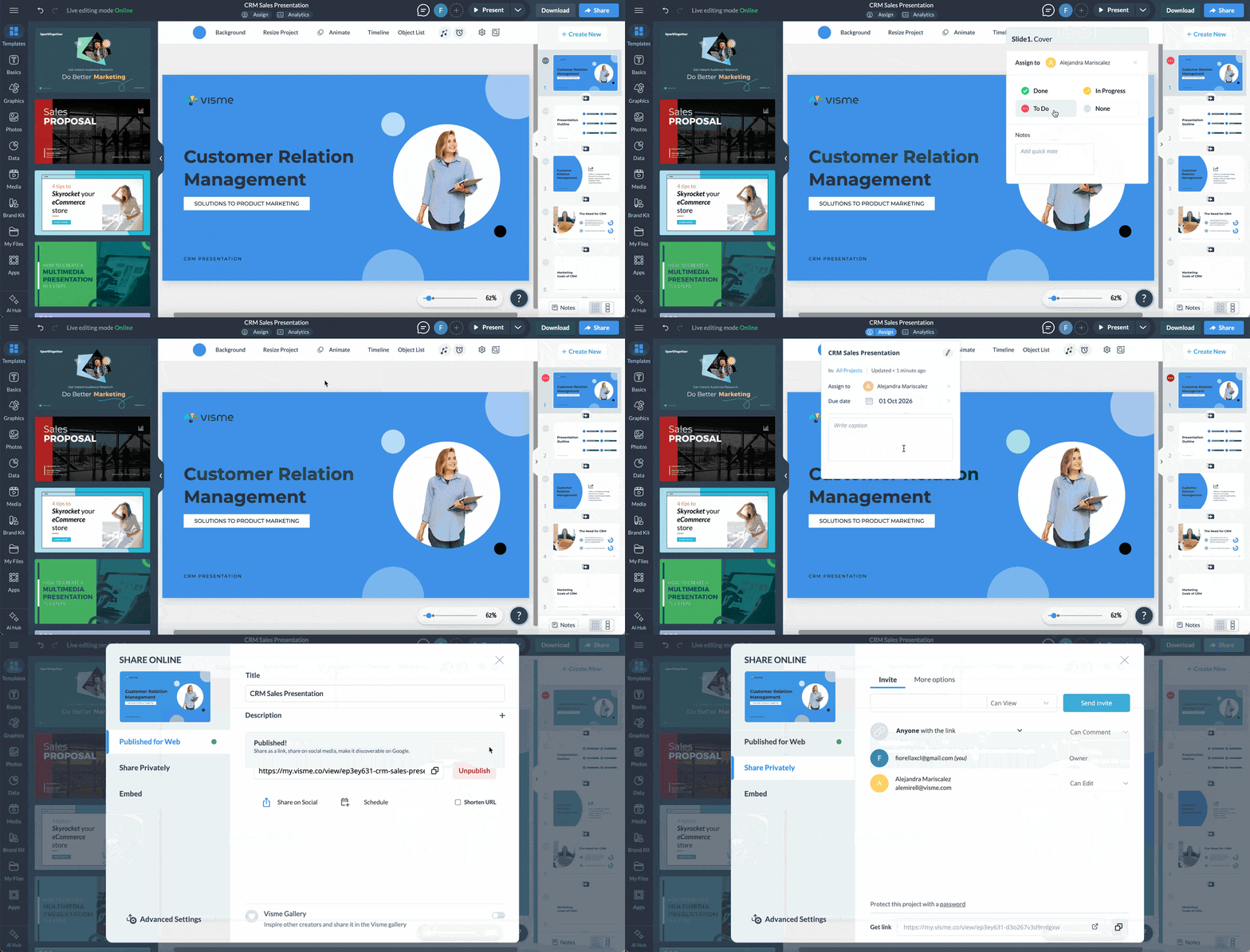
That workflow gives reps room to tailor content without starting from scratch or asking marketing to review every deck. Teams can share presentations through links and track engagement. For larger sales groups, Visme combines creation, content management, brand controls and analytics in one workflow.
Canva Business may suit teams where marketing creates most of the material that sales uses. It supports presentations alongside social graphics, documents, video and other creative formats, with Brand Controls and approvals. If sales needs detailed prospect engagement data, test whether its insights meet that need.
Smaller teams looking to create and personalize decks quickly can also test Pitch and Gamma. Pitch offers collaborative editing, shared teamspaces and trackable links. Gamma uses AI to speed up creation and offers analytics, though external viewers who aren’t signed in may appear as anonymous.
PowerPoint or Google Slides may already be enough if buyers regularly request editable files and the team doesn’t need detailed engagement analytics. Copilot and Gemini add AI assistance to those familiar workflows. If the requirement is organization-wide content usage, coaching and performance insight, presentation software may be too narrow; compare sales enablement products such as Highspot and Seismic.
Estimate the cost of your current process
A software subscription has a visible price. The cost of the current workflow is scattered across rep time, marketing maintenance, design fixes and enablement follow-up. Estimate that cost before comparing plans.
1. Count the time reps spend
Number of reps × hours per month spent finding, building or rebuilding sales material × loaded hourly cost × 12
A sales leader cited in the source said that preparing and sending a deck could take 10 to 14 days. That’s one team’s experience, not a benchmark for every organization. The practical lesson is to measure your own process rather than relying on a quick estimate.
Ask several reps to track their time for a few weeks. Include the whole job, from finding material and making changes to getting it reviewed and sent. The result can differ sharply from what people remember in a meeting.
2. Include time from other teams
Count the hours marketing, enablement and design spend maintaining duplicate versions, answering questions about the latest deck, correcting off-brand files, rebuilding existing material, updating slides across files, helping reps personalize presentations and reviewing high-stakes work.
3. Price the plan your team needs
Don’t multiply the lowest advertised seat price by headcount if your required features sit on a higher tier. Include implementation or migration, training and any required add-ons.
Annual seat cost + implementation and migration + training + required add-ons
Then compare the platform’s total cost with the time and support built into the current process. The purpose is to compare like with like, not to assume new software will always be cheaper.
Choose for the renewal, not the demonstration
Initial setup matters, but continued use is the real test. The source reports that Visme administrators say they can get a team started in about 30 minutes with an overview, access and time to explore. Treat that as a point of comparison, then measure how long your own reps need before they feel confident working independently.
Ask whether a rep would choose the new process on a busy Tuesday. If the answer is no, a long feature list may not carry the tool through renewal. Test the work with your own content, price the plan that meets your requirements and choose a workflow reps will use.
Frequently asked questions
What matters most when a sales team grows?
Look beyond templates and basic editing. Content management, brand controls, personalization, sharing and buyer engagement data tend to matter more as more reps create and reuse sales material. Visme and Beautiful.ai offer team features in these areas; Canva Business may suit a team that relies mainly on marketing-created material. PowerPoint and Google Slides can work well for teams that mostly share files and don’t need detailed prospect analytics.
How can we keep reps on current material?
Give reps one place to find approved sales content rather than relying on files in shared drives, inboxes and individual computers. Check whether administrators can manage, update and retire assets, and whether reps can identify the current version quickly.
Can reps personalize a deck without changing the brand?
Yes. Look for controls that let administrators lock logos, fonts, layouts and other brand elements while leaving prospect-specific sections editable. A rep can then adjust industry context, customer challenges or relevant proof points without rebuilding the presentation.
Which platforms offer presentation analytics?
Visme, Beautiful.ai, Pitch and Gamma offer analytics, with different levels of detail and plan access. Depending on the product and sharing settings, reports may include presentation views, slide views, time spent or viewer details. Test with an external viewer before buying if prospect-level analytics matter.
Should reps send a link, PDF or PowerPoint file?
Choose based on how the buyer needs to use the material. A link can preserve interactive content and may offer engagement data. A PDF is easy to download and forward. Many teams need both, plus PPTX export for buyers who want an editable file or offline use.
What will software cost for 25 users?
The answer depends on the platform, plan and required features. Multiplying the advertised seat price by 25 may miss costs for SSO, advanced analytics, permissions or other higher-tier controls. Compare every product against the same 25-user scenario and feature list.
What should we look for when replacing an existing tool?
Start with the reason for the change. If the problem is managing sales material across a growing team, prioritize content management, brand controls, quick personalization, link sharing and analytics. If the team creates proposals and one-pagers too, check those formats. Keep PDF and PowerPoint export in the evaluation if buyers still request files.
How do Visme and Canva differ for sales teams?
Both support visual content, but they can fit different workflows. Visme brings presentations, proposals, one-pagers and other sales material together with brand controls, sharing and presentation analytics. Canva covers a broad set of creative and marketing formats, which may suit teams where sales mainly uses content created by marketing. Decide whether the purchase centers on the sales workflow or content creation across the wider organization.
How do Visme and PowerPoint differ?
PowerPoint offers a familiar editor, offline work and broad PPTX compatibility. Visme adds a shared workspace for creating and managing different types of sales material, along with brand controls, link sharing and engagement analytics. If the team mainly creates and sends presentation files, PowerPoint may cover the need. If you need more control over how material is created, shared and measured, compare the added capabilities.
Choose for the work reps do
The right platform is the one that helps reps find suitable material, tailor it to an opportunity and get it to every relevant stakeholder, while giving sales and marketing the control and visibility they need. Try the workflow with your own reps and content, confirm the full price and assess whether the team will still use it at renewal. For teams exploring that process in Visme, the Visme sales team page describes its offering.